
07.completeWork
同学们好,这一小节我们就来实现render函数中completeWork部分的逻辑。 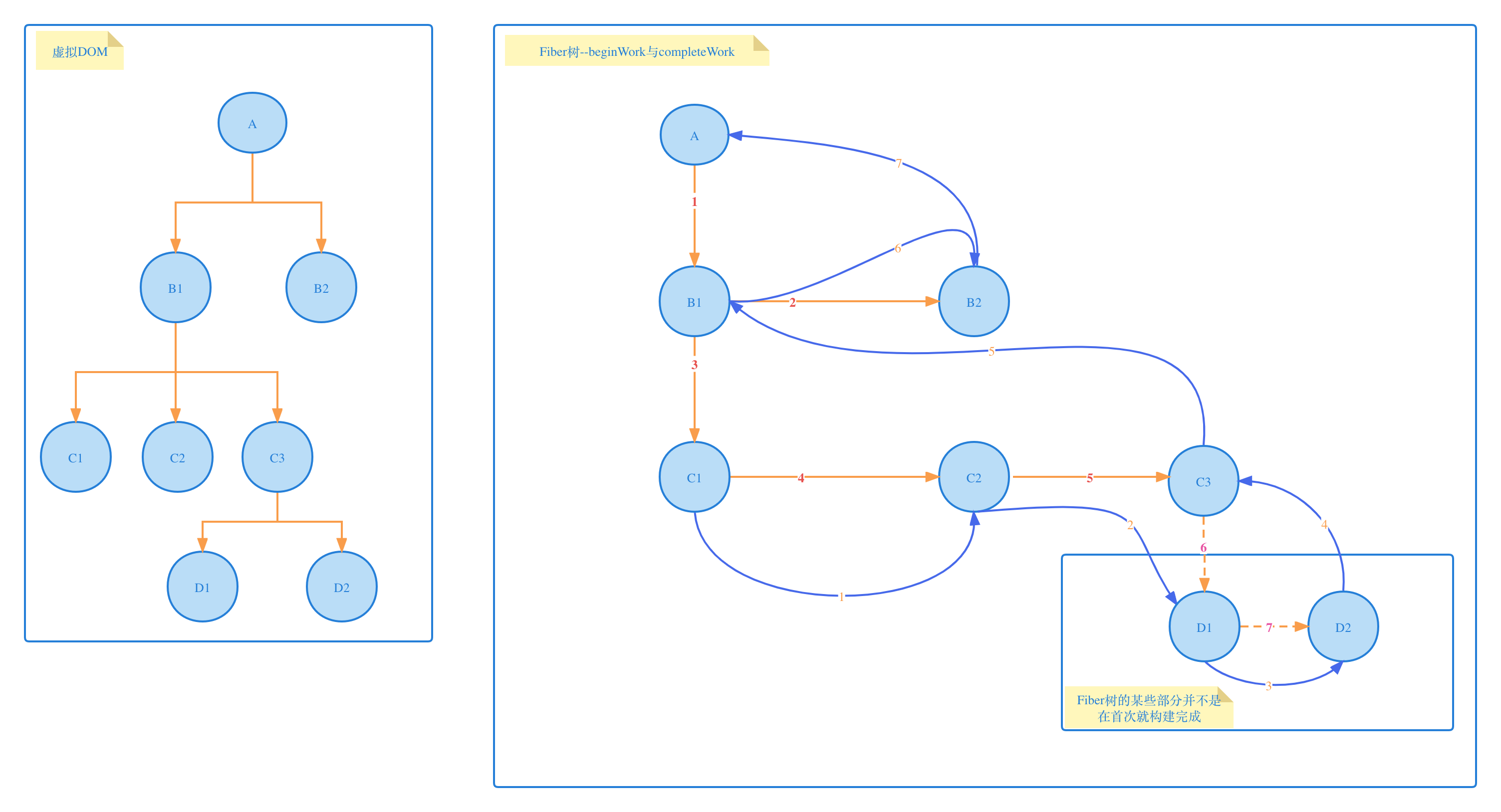
packages/react-reconciler/src/ReactFiberWorkLoop.js
diff
import { scheduleCallback } from "scheduler";
import { createWorkInProgress } from "./ReactFiber";
import { beginWork } from "./ReactFiberBeginWork";
+import { completeWork } from "./ReactFiberCompleteWork";

let workInProgress = null;

/**
 * 在 Fiber 上计划更新根节点。
 * @param {*} root - 根节点。
 */
export function scheduleUpdateOnFiber(root) {
  ensureRootIsScheduled(root);
}

/**
 * 确保根节点被调度执行。
 * @param {*} root - 根节点。
 */
function ensureRootIsScheduled(root) {
  scheduleCallback(performConcurrentWorkOnRoot.bind(null, root));
}

/**
 * 执行根节点上的并发工作。
 * @param {*} root - 根节点。
 */
function performConcurrentWorkOnRoot(root) {
  renderRootSync(root);
  const finishedWork = root.current.alternate;
  root.finishedWork = finishedWork;
- //commitRoot(root);
+ commitRoot(root);
}

+/**
+ * 提交根节点。
+ * @param {*} root - 根节点。
+ */
+function commitRoot(root) {
+  console.log('开始commitWork')
+}

/**
 * 准备一个新的工作栈。
 * @param {*} root - 根节点。
 */
function prepareFreshStack(root) {
  workInProgress = createWorkInProgress(root.current, null);
}

/**
 * 同步渲染根节点。
 * @param {*} root - 根节点。
 */
function renderRootSync(root) {
  prepareFreshStack(root);
  workLoopSync();
}

/**
 * 同步工作循环。
 */
function workLoopSync() {
  while (workInProgress !== null) {
    performUnitOfWork(workInProgress);
  }
}

/**
 * 执行一个工作单元。
 * @param {*} unitOfWork - 工作单元。
 */
function performUnitOfWork(unitOfWork) {
  const current = unitOfWork.alternate;
  const next = beginWork(current, unitOfWork);
  unitOfWork.memoizedProps = unitOfWork.pendingProps;
- workInProgress = null //临时加上,防止死循环
  if (next === null) {
    completeUnitOfWork(unitOfWork);
  } else {
    workInProgress = next;
  }
}

/**
 * 完成一个工作单元。
 * @param {*} unitOfWork - 工作单元。
 */
function completeUnitOfWork(unitOfWork) {
- console.log('开启comleteWork阶段')
+  let completedWork = unitOfWork;
+
+  do {
+    const current = completedWork.alternate;
+    const returnFiber = completedWork.return;
+    completeWork(current, completedWork);
+
+    const siblingFiber = completedWork.sibling;
+    if (siblingFiber !== null) {
+      workInProgress = siblingFiber;
+      return;
+    }
+
+    completedWork = returnFiber;
+    workInProgress = completedWork;
+  } while (completedWork !== null);
}
packages/react-reconciler/src/ReactFiberCompleteWork.js
js
import {
  createTextInstance,
  createInstance,
  appendInitialChild,
  finalizeInitialChildren
} from 'react-dom-bindings/src/client/ReactDOMHostConfig';
import { NoFlags } from "./ReactFiberFlags";
import { HostComponent, HostRoot, HostText } from "./ReactWorkTags";

/**
 * 为完成的fiber节点的父DOM节点添加所有子DOM节点
 * @param {DOM} parent - 完成的fiber节点对应的真实DOM节点
 * @param {Fiber} workInProgress - 已完成的Fiber节点
 */
function appendAllChildren(parent, workInProgress) {
  let node = workInProgress.child;
  while (node) {
    if (node.tag === HostComponent || node.tag === HostText) {
      appendInitialChild(parent, node.stateNode);
    } else if (node.child !== null) {
      node = node.child;
      continue;
    }
    if (node === workInProgress) {
      return;
    }
    while (node.sibling === null) {
      if (node.return === null || node.return === workInProgress) {
        return;
      }
      node = node.return;
    }
    node = node.sibling;
  }
}

/**
 * 完成一个Fiber节点
 * @param {Fiber} current - 当前旧的Fiber节点
 * @param {Fiber} workInProgress - 新建的Fiber节点
 */
export function completeWork(current, workInProgress) {
  const newProps = workInProgress.pendingProps;
  switch (workInProgress.tag) {
    case HostRoot:
      bubbleProperties(workInProgress);
      break;
    case HostComponent:
      const { type } = workInProgress;
      const instance = createInstance(type, newProps, workInProgress);
      appendAllChildren(instance, workInProgress);
      workInProgress.stateNode = instance;
      finalizeInitialChildren(instance, type, newProps);
      bubbleProperties(workInProgress);
      break;
    case HostText:
      const newText = newProps;
      workInProgress.stateNode = createTextInstance(newText);
      bubbleProperties(workInProgress);
      break;
  }
}

/**
 * 冒泡处理已完成Fiber节点的属性
 * @param {Fiber} completedWork - 已完成的Fiber节点
 */
function bubbleProperties(completedWork) {
  let subtreeFlags = NoFlags;
  let child = completedWork.child;
  while (child !== null) {
    subtreeFlags |= child.subtreeFlags;
    subtreeFlags |= child.flags;
    child = child.sibling;
  }
  completedWork.subtreeFlags = subtreeFlags;
}
packages/react-dom-bindings/src/client/ReactDOMHostConfig.js
diff
+// 引入初始属性设置函数
+import { setInitialProperties } from './ReactDOMComponent';

/**
 * 判断是否需要设置文本内容
 *
 * @param {string} type - DOM元素的类型
 * @param {Object} props - 元素属性对象
 * @return {boolean} - 如果children属性是字符串或数字,返回true,否则返回false
 *
 * shouldSetTextContent函数用于判断基于给定的属性,是否应该设置DOM元素的文本内容。
 */
export function shouldSetTextContent(type, props) {
  return typeof props.children === "string" || typeof props.children === "number";
}

+/**
+ * 创建文本节点实例
+ *
+ * @param {string} content - 文本内容
+ * @return {Text} - 创建的文本节点
+ *
+ * createTextInstance函数用于创建一个新的文本节点,其中的内容是传入的content参数。
+ */
+export function createTextInstance(content) {
+  return document.createTextNode(content);
+}

+/**
+ * 创建DOM元素实例
+ *
+ * @param {string} type - DOM元素的类型
+ * @return {HTMLElement} - 创建的DOM元素
+ *
+ * createInstance函数用于创建一个新的DOM元素,元素类型由传入的type参数指定。
+ */
+export function createInstance(type) {
+  const domElement = document.createElement(type);
+  return domElement;
+}

+/**
+ * 将初始子节点附加到父节点
+ *
+ * @param {HTMLElement} parent - 父节点
+ * @param {HTMLElement|Text} child - 子节点
+ *
+ * appendInitialChild函数用于将子节点附加到指定的父节点。
+ */
+export function appendInitialChild(parent, child) {
+  parent.appendChild(child);
+}

+/**
+ * 为DOM元素设置初始属性
+ *
+ * @param {HTMLElement} domElement - 目标DOM元素
+ * @param {string} type - DOM元素的类型
+ * @param {Object} props - 需要设置的属性对象
+ *
+ * finalizeInitialChildren函数用于在DOM元素创建完成后,设置其初始属性。
+ */
+export function finalizeInitialChildren(domElement, type, props) {
+  setInitialProperties(domElement, type, props);
+}
packages/react-dom-bindings/src/client/ReactDOMComponent.js
js
// 引入CSS样式设置函数
import { setValueForStyles } from './CSSPropertyOperations';
// 引入文本设置函数
import setTextContent from './setTextContent';
// 引入DOM属性设置函数
import { setValueForProperty } from './DOMPropertyOperations';


/**
 * 设置初始DOM属性
 *
 * @param {string} tag - DOM元素的标签名
 * @param {HTMLElement} domElement - 目标DOM元素
 * @param {Object} nextProps - 需要设置的属性对象
 *
 * setInitialDOMProperties函数用于设置目标DOM元素的初始属性。它遍历nextProps对象中的所有属性,
 * 对于'style'属性,使用setValueForStyles函数设置DOM元素的样式;
 * 对于'children'属性,根据属性值的类型(字符串或数字),使用setTextContent函数设置DOM元素的文本内容;
 * 对于其他非空属性,使用setValueForProperty函数设置DOM元素的对应属性。
 */
function setInitialDOMProperties(tag, domElement, nextProps) {
  for (const propKey in nextProps) {
    if (nextProps.hasOwnProperty(propKey)) {
      const nextProp = nextProps[propKey];
      if (propKey === 'style') {
        setValueForStyles(domElement, nextProp);
      } else if (propKey == 'children') {
        if (typeof nextProp === 'string') {
          setTextContent(domElement, nextProp);
        } else if (typeof nextProp === 'number') {
          setTextContent(domElement, `${nextProp}`);
        }
      } else if (nextProp !== null) {
        setValueForProperty(domElement, propKey, nextProp)
      }
    }
  }
}

/**
 * 设置初始属性
 *
 * @param {HTMLElement} domElement - 目标DOM元素
 * @param {string} tag - DOM元素的标签名
 * @param {Object} props - 需要设置的属性对象
 *
 * setInitialProperties函数是setInitialDOMProperties函数的外部接口,它直接调用setInitialDOMProperties函数,
 * 将传入的参数domElement, tag, props作为参数传递给setInitialDOMProperties函数。
 */
export function setInitialProperties(domElement, tag, props) {
  setInitialDOMProperties(tag, domElement, props);
}
packages/react-dom-bindings/src/client/CSSPropertyOperations.js
js
/**
 * 设置节点的样式
 *
 * @param {HTMLElement} node - 目标节点
 * @param {Object} styles - 包含样式属性和值的对象
 *
 * setValueForStyles函数用于遍历传入的styles对象,并将其属性值应用到目标节点的style属性中。
 * 该函数首先获取节点的style属性,然后遍历styles对象。如果styles对象有对应的样式属性,则获取对应的样式值,
 * 并将该样式值应用到节点的style属性中。
 */
export function setValueForStyles(node, styles) {
  const { style } = node;

  for (const styleName in styles) {
    if (styles.hasOwnProperty(styleName)) {
      const styleValue = styles[styleName];
      style[styleName] = styleValue;
    }
  }
}
packages/react-dom-bindings/src/client/setTextContent.js
js
/**
 * 设置节点的文本内容
 *
 * @param {HTMLElement} node - 需要设置文本内容的DOM节点
 * @param {string} text - 需要设置的文本内容
 *
 * setTextContent函数用于设置指定DOM节点的文本内容。
 */
function setTextContent(node, text) {
  node.textContent = text;
}

// 导出setTextContent函数
export default setTextContent;
packages/react-dom-bindings/src/client/DOMPropertyOperations.js
js
/**
 * 设置节点的属性
 *
 * @param {HTMLElement} node - 目标节点
 * @param {string} name - 属性名
 * @param {*} value - 属性值
 *
 * setValueForProperty函数用于设置目标节点的属性。如果传入的属性值为null,
 * 则会移除节点的对应属性,否则,会将属性值设置到节点的对应属性上。
 */
export function setValueForProperty(node, name, value) {
  if (value === null) {
    node.removeAttribute(name);
  } else {
    node.setAttribute(name, value);
  }
}